Promote Employee
This is a sample placeholder for hr-operation-promote-employee documentation.
Promotions and Appreciation Guide
This guide explains the Promotions and Appreciation section under the HR Operations menu. It provides insights on how to process employee promotions, define new designations, and document salary revisions.
🎯 Overview
The Promotions and Appreciation module is used to:
- Record employee promotions
- Track role/designation changes
- Update and document revised salary information
- Store promotion history and reasoning
The interface includes:
- Promotion Assignment Panel (Form for new promotions)
- Promotion Listing Table (Record of all past promotions)
👤 User View (Employee)
In the User View, employees can:
- View their promotion history
- See revised designations and pay (once approved)
- Understand reasons logged for their promotion
❌ Note: Users cannot promote themselves or others. This functionality is restricted to Admins only.
🛠️ Admin View
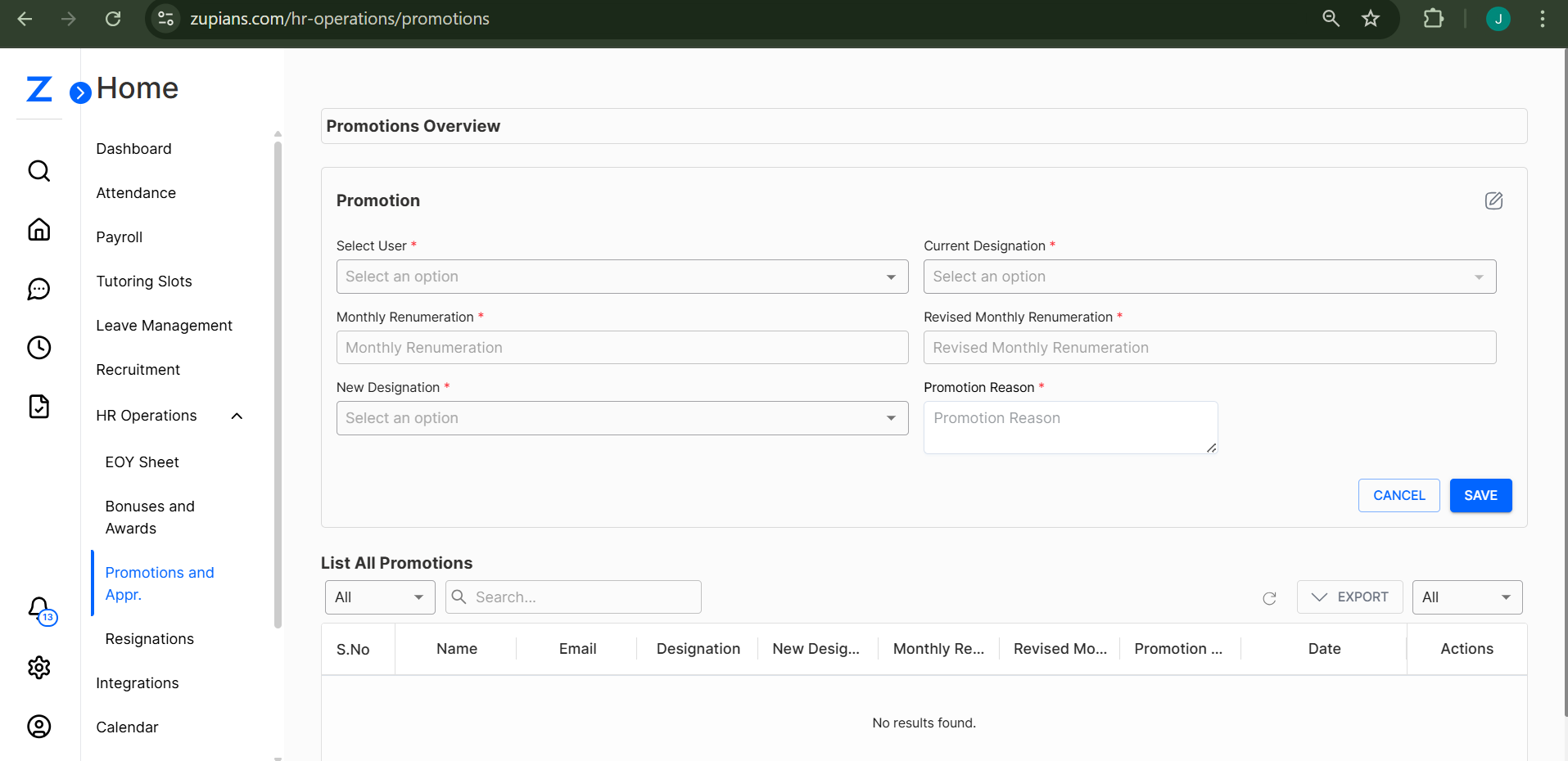 Admins can assign new promotions using the Promotion form shown above.
Click on the form fields to initiate a promotion entry.
🔽 Fields Required:
- Select User – Choose the employee being promoted
- Current Designation – Auto-filled or selected
- Monthly Remuneration – Current salary (before promotion)
- Revised Monthly Remuneration – Updated salary post-promotion
- New Designation – Choose from:
- Senior Manager
- Team Lead
- Department Head
- Promotion Reason – Add a description or justification for the promotion
✅ After completing the form, click Save to submit the promotion.
🛑 Use Cancel to discard the entry if needed.
📋 Promotion Listing Table
Below the promotion form is the List All Promotions table. This tracks all promotion records and can be filtered.
Columns Include:
- S.No
- Name
- Designation
- New Designation
- Monthly Remuneration
- Revised Monthly Remuneration
- Promotion Reason
- Date
- Actions
🔍 Use search and filters to narrow down by name, designation, or promotion reason.
📤 Export and History
✅ Click Export to download a CSV record of all promotions.
✅ Easily accessible for HR audits, performance tracking, or payroll updates.
💡 Best Practices
- 🕒 Promote employees based on verified reviews and evaluations.
- 📝 Clearly state the reason for promotion for transparency.
- 🔒 Keep designations and salaries in sync with internal policies.
That's all for Promotions and Appreciation! This tool helps maintain recognition and role clarity across your workforce. 🌟📈