Tutoring Slots Guide
This guide covers the Tutoring Slots module in Zupians, helping you understand slot bookings, slot history, and how to manage your tutoring schedule.
🎯 Tutoring Slot Stats
At the top of the Tutoring Slots page, you’ll find quick stats that give you an overview of slot activity for the selected date range:
✅ Booked Slots
✅ Rescheduled Slots
✅ Cancelled Slots
✅ Late & No-Shows
Here’s a visual example of the Tutoring Slots dashboard:
![Tutoring Slots Overview]
📈 Key Slot Stats
| Stat | Count | Change Compared to Previous Day |
|---|---|---|
| Booked Slots | 10 | +5 |
| Rescheduled Slots | 4 | -5 |
| Cancelled Slots | 4 | -5 |
| Late & No-Shows | 6 | -5 |
✅ These figures help you track slot performance day-to-day.
📜 Tutoring Slot History
Below the stat cards is the Tutoring Slots table, showing detailed records of all tutoring slots.
Columns include:
- S.No
- Name
- Department
- Today’s Slots
- Monthly Slots
- OOA (Out of Area) Slots
- Non-OOA Slots
- Extra Slots
- Off Slots
- Action
Here’s a closer look:
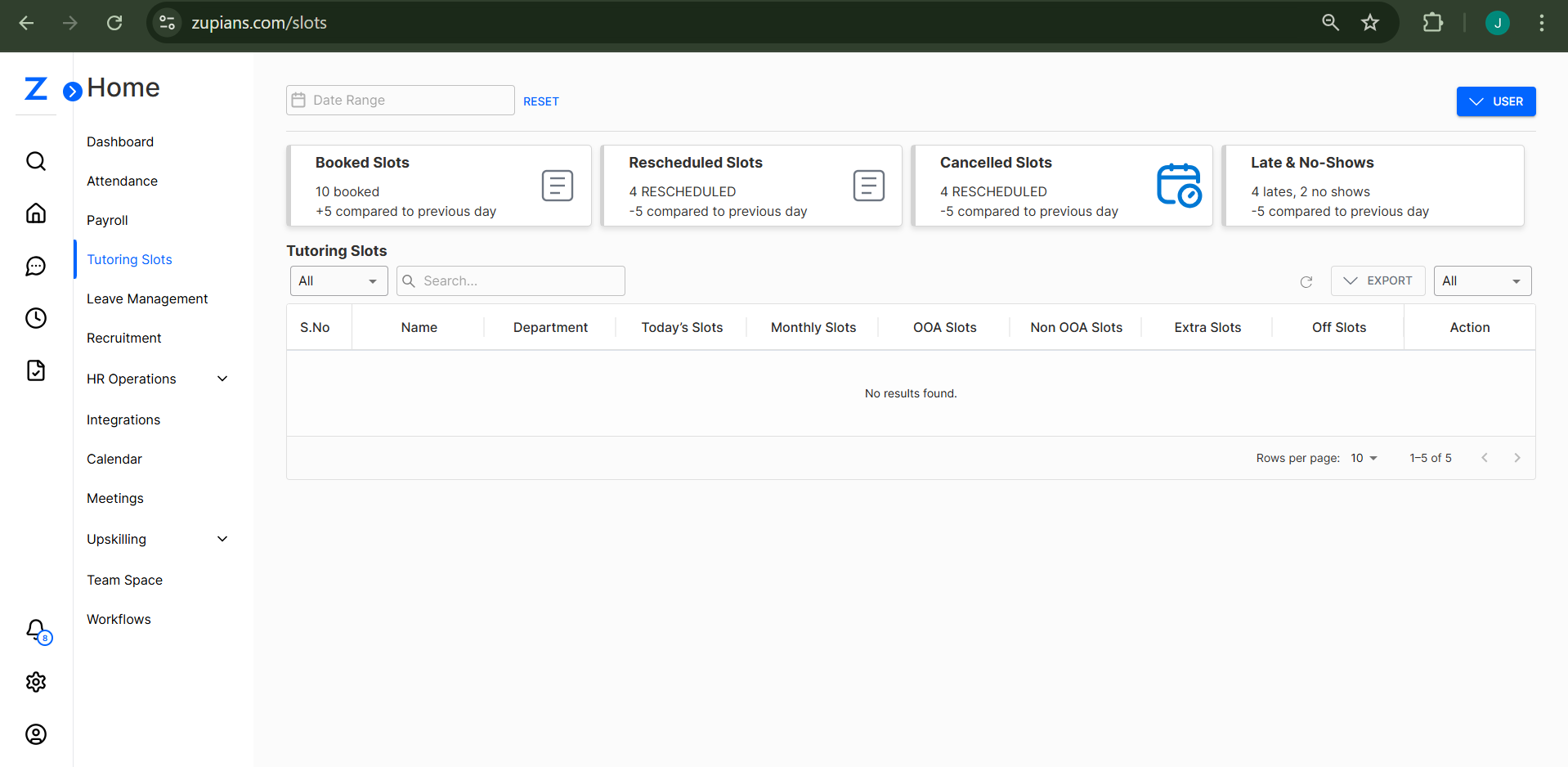
ℹ️ Note: In the screenshots, no rows are currently displayed. When data is available, this table will show each slot’s detailed information.
🔍 Filters & Search
✅ Use the search bar to filter slots by name or department.
✅ Use the dropdown to switch between All, Active, and Inactive slot records.
🗓️ Date Range
Select a specific date range to view slots from a particular timeframe:
![Date Range Picker]
📤 Export Slot Data
Use the Export button at the top right of the table to download the slots data in CSV or other formats for reporting or analysis.
⚙️ Tips for Managing Tutoring Slots
✅ Regularly review slot activity to ensure optimal scheduling.
✅ Check Late & No-Shows to improve future performance.
✅ Use filters to locate and manage specific slot data.
✅ Export data for external analysis or HR documentation.
That’s it! This guide ensures you’re well-equipped to navigate the Tutoring Slots module in Zupians and keep your tutoring sessions running smoothly. 🎓✨
Would you like me to package this into a ZIP file or share it directly as a final Markdown file? Let me know! 🚀😊