👤 Personal Info Guide
The Personal Info section helps users manage and update their key employment and identification details.
📝 Navigating to Personal Info
- From the left navigation bar, click the Profile Icon (bottom left).
- You will be redirected to your Profile page.
- By default, the Personal Info tab is active.
🔍 Personal Info Fields Overview
| Field | Description |
|---|---|
| First Name* | Enter your legal first name. |
| Middle Name | Optional. Only fill if you have one. |
| Last Name* | Enter your legal surname. |
| Mobile Number* | Your 10-digit mobile number. Not editable once verified. |
| Country Code* | Choose the country code. (e.g., +91 for India) |
| Department* | Your department (auto-filled by HR). |
| Designation* | Your role/title (e.g., QA, Developer, etc.). |
| Experience in Years* | Total years of relevant professional experience. |
| Email ID* | Your official work email (auto-filled). |
| Date of Birth (DoB)* | Must reflect your official documents. Format: DD/MM/YYYY. |
| Joining Date* | Your joining date at the organization. |
| Notice Period (in Days)* | Duration for serving notice (predefined by HR). |
| Marital Status* | Select from: Un Married / Married / Do not want to disclose. |
| Mother Name* | Enter your mother's full name. |
| Father Name* | Enter your father's full name. |
Note: All
*marked fields are mandatory.
⚠️ Validation Rules
- Date of Birth and Joining Date cannot be the same.
- Mobile number must be valid and 10 digits.
- Email should follow standard formats (e.g.,
user@domain.com). - Experience must be a numeric value (years only).
- Notice period cannot be less than company policy (usually 30 days).
🔒 Change Password
To update your password:
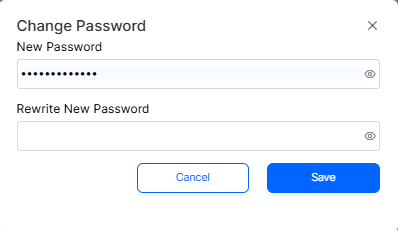
- Click Change Password under your profile card.
- In the popup:
- Enter your New Password.
- Re-enter it in Rewrite New Password.
- Click Save to confirm the changes.
🧠 Frequently Asked Questions (FAQ)
1. Can I edit my email or mobile number?
No. These fields are system-controlled. Please contact HR or Admin to request any updates.
2. Why can't I save the form?
Make sure: - All mandatory fields are filled - There are no validation errors (e.g., Date of Birth cannot be the same as Joining Date)
3. Can I leave the middle name blank?
Yes. The Middle Name field is optional and can be skipped if not applicable.
4. What format should the dates follow?
All date fields must use the format:
DD/MM/YYYY 5. What happens after I change my password?
You’ll be required to re-login the next time you access the platform using the new password.
✅ Best Practices
- Double-check all entries before saving.
- Keep your emergency contact info and documents updated regularly.
- Update your experience as soon as relevant.